
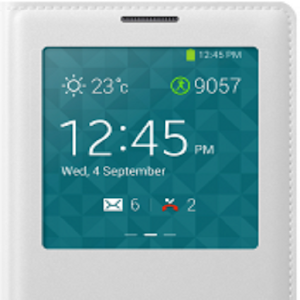
S View Clock ON
This enables smartphones to be used as Dock Clock.Features:-========1) When the clock goes off after S View Cover gets closed , "S View Clock ON" will switch on the clock and will display it continuously.2) Option provided to enable or disable the "S View Clock ON".3) Option provided to restart the "S View Clock ON" automatically after the phone restart or Power On.4) To switch off the clock when "S View Clock ON" is running , open S View Cover , lock the screen and close the S View Cover.5) No sensors are used.
Power consumed by "S View Clock ON" is very much negligible and close to zero.
Note:-=====1) Tested "S View Clock ON" with Galaxy S5 , Galaxy S4 , Galaxy Note 3 and Galaxy Grand 2.2) Works well even with unauthentic or fake S View Covers too.3) When Clock is displayed permanently, it will consume power for displaying the clock and enabling backlight.4) There is one second delay to receive whether the S View Cover is closed or opened.
Blame samsung.
:)5) Refer the attached video for the user demo.6) Feel free to contact for suggestions and additional feature request.
Version 2.0 :-==========
► Added an option "Clock ON Duration".
After this duration Clock will be turned OFF.► If "Clock ON Duration" is set to "30" then Clock will be OFF after "30" minutes.
► If "Clock ON Duration" is set to "0" or left blank then Clock will be ON forever.► Redesigned the UI.
Version 2.1 :-==========
► Added Notification support.
"S View Clock ON" can be enabled or disabled from Notifications.
Version 2.2 :-==========
► Added an option to keep the Clock ON when the device is connected to Power/USB while the service is running.
Version 3.0 :-==========
► Changed the background logic to make it work across all the Samsung devices which supports S View cover.► Using android light and proximity sensors to keep the clock ON.
When the cover is closed , app will enable the display to show the S View Clock Permanently.► In older versions i used Samsung APIs but they were not consistent even across variants of the same device.► Tested battery usage using Galaxy S5.
S View Clock ON used 0.6% of the battery in 15 hours ( < 1% per day ).
Version 3.1 :-==========
► Fixed the issue , "Screen flashes ON and OFF every 5 seconds" as reported by few users.
Version 3.2 :-==========
► Fixed the issue - in some devices Screen doesn't turn OFF.► Fixed the issue - in some devices when after "Duration of the Clock" expires it turns ON again.
About S View Clock ON
- Package name (App ID)
- app.vel.murugan.sviewclockon
- Available on
- Google Play
- Price
- Free
- Version
- v3.2
- Developer
- Samsung Electronics Co., Ltd.
Looking for the S View Clock ON APK?
The safest way to get S View Clock ON (app.vel.murugan.sviewclockon) on your Android device is to install it directly from Google Play — you'll always get the latest official version, automatic updates, and no risk of modified or infected APK files from third-party sites.
Social Features
Connect and share with friends and the community.
Gaming Features
Enjoy immersive gaming experience with various game modes.
Camera Features
Advanced camera features with editing capabilities.
See S View Clock ON in Action


Frequently Asked Questions
Is S View Clock ON free?
Yes, S View Clock ON is free to download and install on Android through Google Play.
How do I install S View Clock ON on Android?
Open Google Play on your Android phone or tablet, search for S View Clock ON by Samsung Electronics Co., Ltd. or tap the Google Play button on this page, then tap Install. The app downloads and installs automatically.
What is app.vel.murugan.sviewclockon?
app.vel.murugan.sviewclockon is the App ID (package name) of S View Clock ON on Google Play. Every Android app has a unique package name, and it is the safest way to verify you are installing the official app.
Is S View Clock ON safe to download?
Installing S View Clock ON from Google Play is the safest option: you get the official version published by Samsung Electronics Co., Ltd., verified by Google Play Protect, with automatic updates. Avoid APK files from unofficial third-party sites.
Get S View Clock ON Today
S View Clock ON for Android — free download on Google Play.
Compatible with Android phones and tablets — available on Google Play.
Ask AI about this app
Get instant answers about features, tips and more from popular AI assistants.